
In accounting and inventory management, tracking inventory through serial numbers is needed for some businesses. SQL-Ledger offers a feature set that includes the management of serial numbers. In this blog post, we’ll see managing serial numbers easily within SQL-Ledger, highlighting its capabilities and limitations.
Entering Serial Numbers: Sales and Purchase Invoices
When creating sales and purchase invoices, SQL-Ledger provides an option to specify serial numbers for the items being transacted. When you click on the check box to the left of Qty label, new rows open allowing you to add additional information for each line item including serial numbers for each line item.

When generating a sales invoice, users can input the serial numbers associated with the products they are selling.
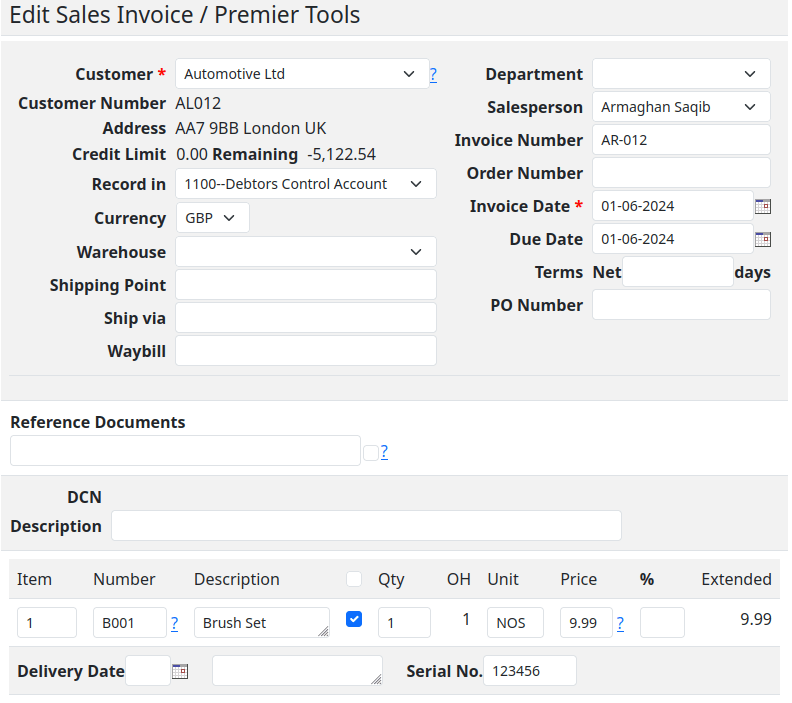
Similarly, during the creation of a purchase invoice, the serial numbers of the acquired items can be recorded.

This dual-entry system ensures that both incoming and outgoing goods are meticulously tracked, providing a clear audit trail from procurement to sale.
Tracking Serial Numbers: The “All Items” Report
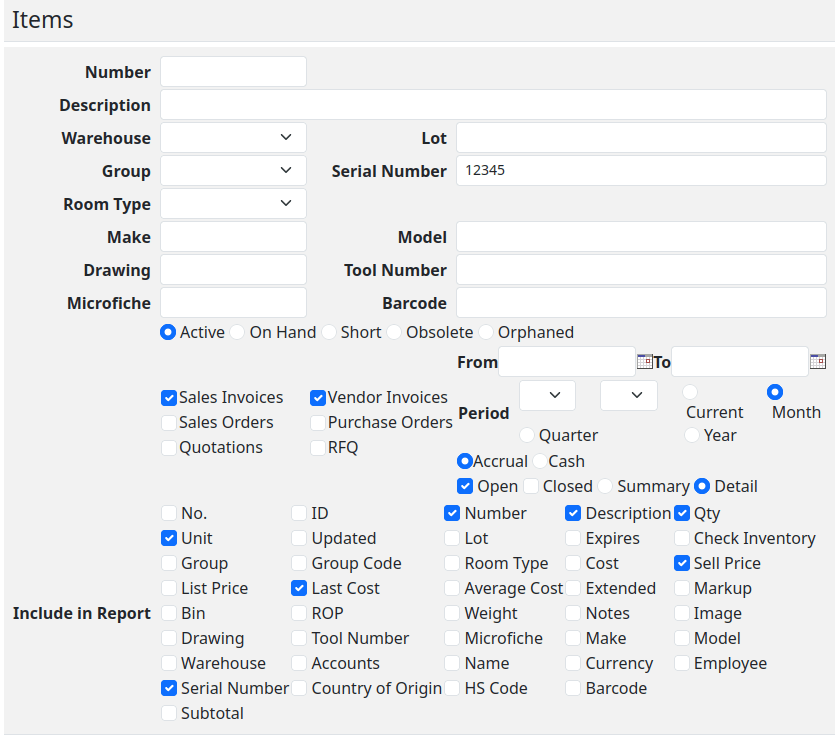
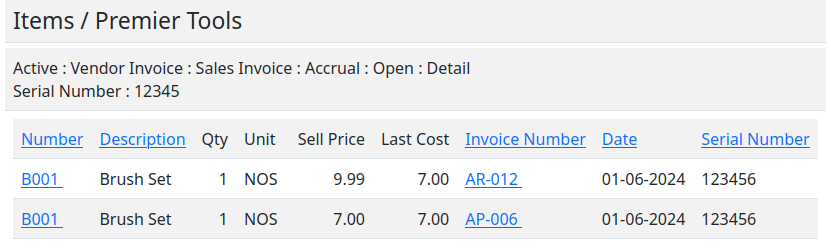
“All Items” report allows users to search for and view the history of any given serial number within the system. Whether you’re verifying the status of a product, conducting an inventory audit, or tracing the lifecycle of an item, the “All Items” report offers a detailed and accessible overview of each serial number’s journey through your business.
A Note on Validation: The Missing Piece
While SQL-Ledger excels in many aspects of serial number management, it’s important to acknowledge a notable limitation: the absence of validation for serial numbers. Currently, if a user enters a serial number in a sales invoice for an item that has not been recorded as purchased, SQL-Ledger will not raise an error. This lack of validation could potentially lead to discrepancies in inventory tracking and reporting if not carefully monitored.
Best Practices for Managing Serial Numbers in SQL-Ledger
To mitigate the limitations and fully leverage the serial number management feature in SQL-Ledger, consider the following best practices:
- Double-Check Entries: Manually verify that the serial numbers entered in sales invoices correspond to items that have been previously recorded as purchased in the system.
- Regular Audits: Conduct periodic audits using the “All Items” report to ensure the accuracy of your inventory and the proper tracking of serial numbers.
- Custom Validation: We also offer custom development options to implement serial number validation within SQL-Ledger, enhancing the integrity of your inventory management process.
Conclusion
SQL-Ledger’s serial number management feature offers a powerful tool for businesses to track and manage their inventory with precision. While the current lack of automatic validation for serial numbers presents a challenge, with careful management and adherence to best practices, users can effectively navigate this limitation. By integrating serial number tracking into your SQL-Ledger workflow, you can achieve greater transparency, accountability, and efficiency in your inventory management practices.
 Ledger123.com